Automate Your Content Creation with AI: Workflows for Agencies and Brands in 2026
How do you automate ad content production with AI? Complete workflows for agencies and brands: from brief to delivery, through generation, testing and optimization, with the tools and templates.
SociaLover Team · Updated · 16 min read
Automating ad content with AI means running one fixed chain every week (brief, angles, visuals, creatives, UGC video, review, export, test) instead of improvising it. A DTC brand runs it once in about two hours; an agency runs it per client with Workflow Pro and one brand kit each. Here are both workflows, step by step, with the tools and the human review points.
Before you start: the 3 prerequisites
The 7-step pipeline and which step to automate first
The pipeline has seven steps (brief, concept, asset generation, review, resize, launch, iterate), and the first one to automate is asset generation, because it is the slowest step and the one where a machine is already better than a person at producing twenty options. Review is the one step you never automate.
The seven steps, with the order in which we automate them on client accounts: generation first, because it is where the time goes; the brief second, because a template removes the improvisation that breaks the rest; resizing third, because it is mechanical. Review stays human at every stage of maturity.
Two things make the first step possible. Start with a brand kit: without it, every generated asset needs a manual pass for colors, fonts and tone, and the automation saves nothing. Then fix the brief template, so the concept step always receives the same fields (product, audience, goal, offer, proof) and the angles it returns are comparable from one week to the next. Once those two exist, Creative Resizer turns the resize step into a single click per approved creative, and the launch step is reduced to uploading, labeling AI-generated media and setting the test budget.
DTC brand workflow (direct-to-consumer)
This workflow is built for a small in-house team that owns one brand and ships a new creative batch every week. It runs in five steps, from the product brief to the test campaign, and each step feeds the next: the brief produces the angles, the angles produce the visuals, the visuals become the finished creatives. Everything happens inside the same account, so your brand kit is applied once and reused at every stage.
Product brief
Fill in your brief template (product, audience, goal, offer). Use Chat Me (Claude Sonnet 4.6 by default, Gemini 2.5 Flash for speed) or Ads Strategist to generate your 10 creative angles and 20 hooks.
Visual generation
Generate 20 to 30 visuals based on your creative angles with FLUX.2, Nano Banana Pro or Seedream 5.0 Pro. Test several backgrounds, contexts, and framings.
Building the final creatives
Combine your best visuals with your text hooks. Batch-generate across all your formats (1:1, 9:16, 4:5).
UGC video production
Select 2 to 3 UGC avatars, assign your scripts, and generate the testimonial videos with Kling 3.0 or Veo 3.1. Label them "AI info" at upload.
Upload and test on Meta
Upload all the creatives into a testing campaign. $5 to $10 a day per creative. Review after 48 to 72 hours.
The five steps above on a single timeline, at the durations listed in each card: 1 h 55 from an empty brief to a live test campaign. Only 50 minutes of that is generation; the rest is briefing, assembling and uploading, which is exactly where a standardised template pays off.
Multi-client agency workflow
An agency has a different problem: not producing more, but producing for several brands at once without mixing them up. The workflow therefore starts from one brand kit per client and leans on Workflow Pro to run the same chain of steps across every account. Review and export stay separated client by client, which is what keeps the whole thing auditable as the volume grows.
Standardized brief per client
Each client has its brand kit configured in SociaLover. The brief is pre-filled with the recurring information.
Batch generation
Use Workflow Pro to chain the steps as nodes: prompt, generation, resize, export. The AI agent builds the pipeline from your description; you keep a review node before the export.
Review and approval
Everything generated lands in the Asset Library. Keep the best creatives, discard the failed generations, and pull out the selection for the client.
Multi-format export
Re-cut the approved creatives into every placement (Meta, TikTok, LinkedIn) with Creative Resizer. Dimensions are adjusted automatically.
Reporting and iteration
Upload the performance exports into Ads Strategist or an LLM to spot patterns and generate the creative recommendations for the following week.
| Criterion | DTC brand | Multi-client agency |
|---|---|---|
| Team size | 1 to 5 people, one brand | 5 to 20 active client accounts |
| Creatives per week | 20 to 50 | 50 to 200 |
| Time per batch | 1 h 55 from brief to test campaign (15 + 30 + 20 + 20 + 30 min) | 2 h of batch generation for 5 clients, then 30 min of review and 5 min of export per client |
| Tool chain | Brief template + Chat Me, then Studio Image, Creative Designer, Avatar Lab + Studio Video, Meta Ads Manager | Brand kit per client, then Workflow Pro, Asset Library, Creative Resizer, Ads Strategist on the Meta exports |
| Bottleneck | Keeping each step fed by the previous one: the brief produces the angles, the angles produce the visuals | Keeping brands apart: review and export are handled client by client so the volume stays auditable |
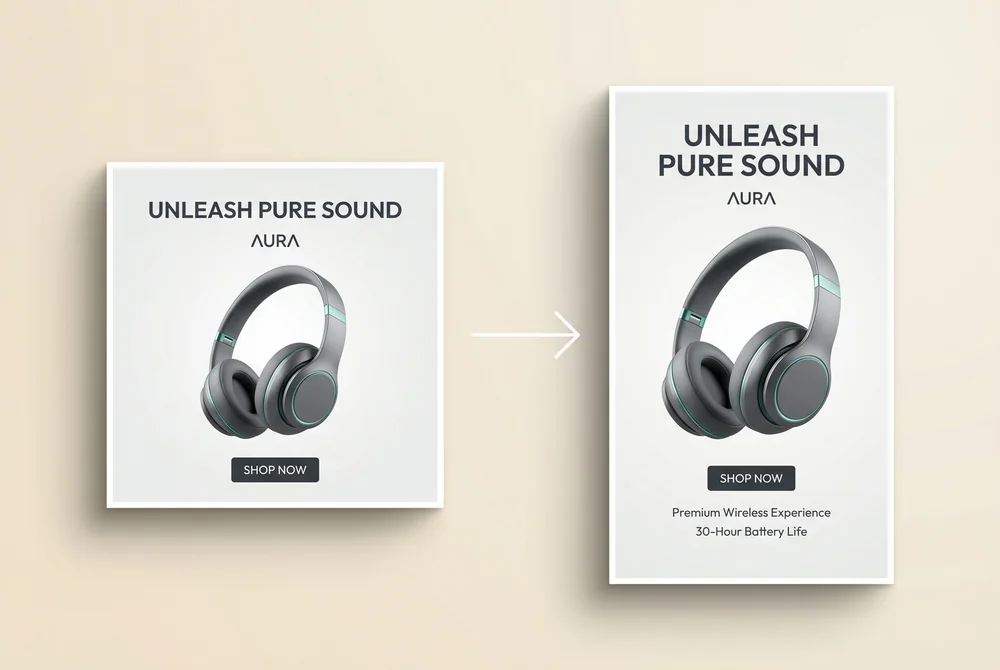
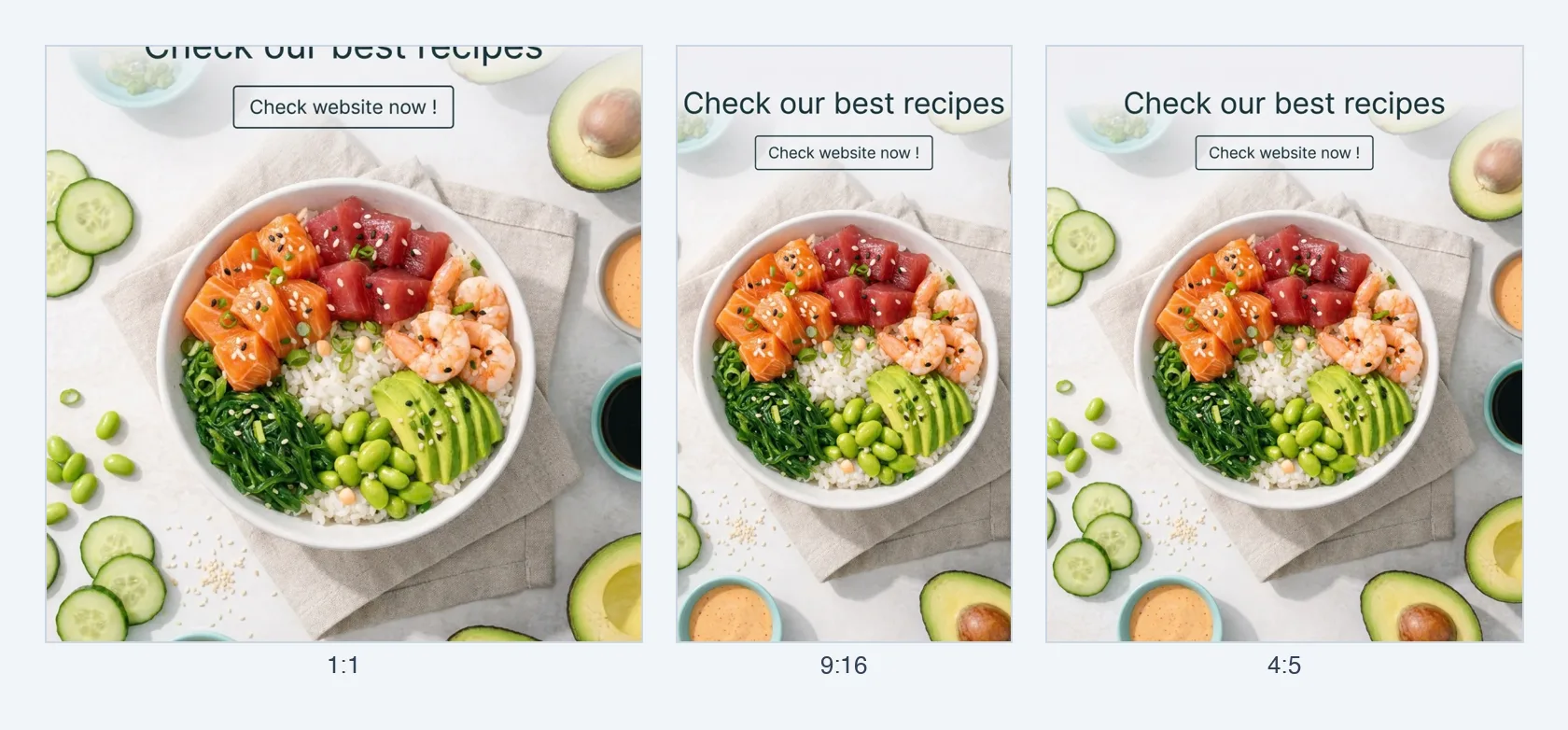
The export step both workflows end on: the same creative cropped to 1:1, 9:16 and 4:5, and Creative Resizer re-cuts an approved creative into every placement (Meta, TikTok, LinkedIn) with the dimensions adjusted automatically.
Workflow Pro and the AI agent: what can actually be automated today
Workflow Pro chains generation steps as nodes on a canvas, and an AI agent builds that pipeline from a plain-language description; what it cannot do, by design, is skip the human review before anything is exported or goes live. That is the honest scope of the automation in September 2026.
The nodes cover the production steps: an LLM node for angles, hooks and scripts (Claude Sonnet 5 or Gemini 3.8 Flash), image generation nodes (FLUX.2, Nano Banana Pro, Seedream 5.0 Pro), video generation nodes (Veo 3.1, Kling 3.0, Seedance 2.5, Wan 2.7), background removal, upscaling, resizing, concatenation and export. You describe the pipeline ("from this product URL, five angles, one static and one 9:16 video per angle, resized for Meta and TikTok") and the agent lays out the nodes and their connections; you adjust, then run it for one brand or for each client's brand kit in turn. Workflow Pro, node-based pipelines has the full node list.
Three limits to plan around. Every run consumes tokens per node, so a pipeline that produces forty assets costs forty generations whether you keep them or not; the rejection rate is a real cost. The review node is mandatory, and it is the step that takes the longest per client in the agency workflow above, because every model still produces a share of unusable outputs. And nothing publishes to Meta or TikTok on its own: the output lands in the Asset Library, a person approves it, labels the AI-generated media and uploads it. For recurring formats (a weekly tips series, an episodic story), Content Series is the simpler tool, and the avatars it uses come from Avatar Lab (in your dashboard).
Tools by tier: no-code, node-based, API
There are three tiers of automation tooling, and most teams need the first two: no-code automators move files and triggers between apps, node-based pipelines generate the creatives, and direct model APIs give full control at engineering cost. None of the three replaces the other two.
| Tier | Examples | What it automates well | Where it stops |
|---|---|---|---|
| No-code automation | Zapier, Make | Moving briefs, files and approvals between your sheet, your drive, your ad account and your inbox; triggering a run when a row is added | It does not generate ad creatives itself and has no notion of brand kit or review; quality control is entirely on you |
| Node-based creative pipelines | Workflow Pro (SociaLover); ComfyUI for image-only, self-hosted | Chaining generation steps with the brand kit applied, producing batches of statics and video from one brief, with a review node before export | It still needs a person to approve, label and upload; and a pipeline is only as good as the brief template that feeds it |
| Direct model APIs | Google, Kling, ByteDance and Black Forest Labs model APIs called from your own code | Anything, with full control over prompts, retries and storage | You rebuild the brand kit, the asset library, the review UI and the billing yourself, and you maintain every model change |
The practical stack for a DTC brand is a no-code trigger (a new row in the brief sheet) that starts a node-based pipeline, and a human in the Asset Library. An agency adds one brand kit per client and one pipeline template reused across them. The API tier only pays off when the volume is in the thousands of assets a month and an engineer is already on staff. Meanwhile, according to Omneky (2026), 87% of marketers already use generative AI somewhere in their process; the difference between the ones who gain time and the ones who do not is whether the process around it was written down first.
The KPIs to measure your AI workflow's efficiency
An automated workflow is only worth the time it gives back, so measure it. Track eight numbers: how many creatives one person ships per hour, how many generations a finished creative actually takes, how long a full batch takes from brief to export, how many generations you throw away, how long a brief takes to become a live ad, what a kept creative costs in tokens, what share of produced creatives actually get tested, and what share of tested creatives win. The figures on the cards below are targets we set with clients, not benchmarks.
The one number you do not have to compute is the invoice: generation is billed in tokens taken from your plan, so a batch is measured in generations consumed rather than in line items. What is worth watching instead is how many passes a creative really takes, because that is where the model choice shows up. A video model that maxes out at 8 seconds in a single pass, like Veo 3.1, needs two generations where Kling 3.0 or Wan 2.7 cover 15 seconds in one, and Seedance 2.5 covers 30. The loop those creatives then go into is described in the creative testing loop; for catalog-heavy accounts, the same KPIs apply to product images at scale and to AI content for e-commerce catalogs.
Creatives/hour
10 to 20 vs 1 to 2 before AI (target we set with clients)
Passes/creative
1 to 2 generations per kept creative
Production time
2 to 4 h per batch vs 2 to 5 days before AI
Rejection rate
Under 20% of generations
Brief to live
Under 48 hours from brief to a running test
Cost per kept creative
Tokens spent divided by creatives kept; watch the trend
Share tested
Over 80% of produced creatives actually enter an ad set
Winner rate
1 in 10 tested creatives earns a scale
The mistakes that block automation
Most automation projects do not fail on the tooling: they fail because the process underneath was never written down. The four mistakes below all come back to the same thing: automating a step that was still improvised. Fix the process first, then let the workflow run it.
Trying to automate without standardizing first: start by defining your templates and processes before automating.
Trying to automate everything at once: start with a single type of creative, master it, then expand.
Neglecting human review: every model still produces a share of unusable outputs (a distorted product, a mangled logo, illegible text). A human eye remains essential before anything goes live.
Not documenting the prompts that work: build an internal prompt library to capitalize on your discoveries.
Frequently asked questions
- What is ad creative automation?
- Running a fixed chain of steps (brief, concept, asset generation, review, resize, launch, iterate) on a schedule, with the generation and formatting steps executed by AI tools and the review step kept human. It is not auto-publishing: the output lands in an asset library, a person approves it, labels AI-generated media and uploads it. The gain: 20 to 50 creatives in about two hours instead of days.
- Can I automate Meta ads creative production without code?
- Yes, up to the upload. A no-code automator such as Zapier or Make can trigger a run when a brief row is added, a node-based pipeline like Workflow Pro generates the statics and videos with the brand kit applied, and Creative Resizer produces every placement. What no tool does without you is approve the outputs, add the "AI info" label and set the budget in Ads Manager.
- What can Workflow Pro chain automatically?
- Generation and formatting steps as nodes: an LLM node for angles, hooks and scripts, image generation (FLUX.2, Nano Banana Pro, Seedream 5.0 Pro), video generation (Veo 3.1, Kling 3.0, Seedance 2.5, Wan 2.7), background removal, upscaling, resizing, concatenation and export. An AI agent lays out the pipeline from a plain-language description. A human review node before export is mandatory, and every node consumes tokens.
- How do I keep several clients' brands separate?
- One brand kit per client, one brief template pre-filled per client, and review and export handled client by client in the Asset Library. Workflow Pro runs the same pipeline template against each brand kit in turn, so the steps are identical but the colors, fonts, tone and assets never cross. That separation is what keeps 50 to 200 creatives a week auditable.
- What do you need before automating content production?
- Three things. A configured brand kit with your colours, fonts, tone of voice and visual references; a standardised brief template for each type of campaign; and a defined AI tool stack that the team actually knows how to use. Automating a step that is still improvised is what makes most of these projects fail.
- How long does one batch of creatives take from brief to launch?
- In the DTC workflow, about 1 h 55: 15 minutes of brief, 30 minutes of visual generation, 20 minutes to assemble the final creatives, 20 minutes of UGC video, and 30 minutes to upload and set up the test campaign. The target we set with clients is under 48 hours from brief to a running test, review included.
- How many generations does one finished creative take?
- One or two in a healthy workflow, which is the flip side of keeping the rejection rate under 20% of generations. On video it also depends on the model: one that maxes out at 8 seconds in a single pass, like Veo 3.1, needs two generations where Kling 3.0 or Wan 2.7 cover 15 seconds in one, and Seedance 2.5 covers 30. Generation is billed in tokens from your plan.
- Which KPIs measure whether the automation is working?
- Eight numbers: creatives shipped per person per hour, generations spent per kept creative, total time for a full batch, the share of generations thrown away, the delay from brief to a live test, the token cost per kept creative, the share of creatives actually tested, and the share of tested creatives that win. The first four measure production; the last four measure whether it feeds the media buying.
- Can the pipeline run without human review?
- No. Every model still produces a share of unusable outputs: a distorted product, a mangled logo, illegible text. A human eye before anything goes live remains part of the workflow, which is why both workflows above keep an explicit review step, and why Workflow Pro keeps a review node before export.
- How does an agency workflow differ from a brand workflow?
- An agency is not trying to produce more, it is trying to produce for several brands at once without mixing them up. So it starts from one brand kit per client, chains the steps with Workflow Pro across every account, and keeps review and export separated client by client so the whole thing stays auditable as volume grows.
Conclusion
Automating AI content creation is not a 6-month project: it is a gradual transformation that starts with a simple workflow and expands over time. Start by automating a single type of creative, measure the gains, and iterate. In 3 months, you will have a productive system that your competitors won't. SociaLover is built specifically for this kind of workflow: from brief to launch, all in one place, with a human review before anything ships.