Using FLUX 1.1 Pro and FLUX.2 for Your Ad Visuals: Complete Prompt Guide (2026)
Flux 1.1 Pro has become one of the go-to models for creating AI ad visuals. Discover how to use it effectively: prompts, settings, use cases and integration into your creative workflow.
SociaLover Team · Updated · 18 min read
FLUX is Black Forest Labs' family of image models. In September 2026 the version you generate ads with in SociaLover is FLUX.2 (text to image, 1K and 2K) and FLUX Kontext (editing from an instruction); FLUX 1.1 Pro and its Ultra raw mode remain on the BFL API. This guide covers the parameters the API really exposes, the prompt structure, and when each variant makes sense.
A warning up front: most "Flux tutorials" circulating online recycle Stable Diffusion settings (steps, CFG or guidance scale, negative prompts) that no FLUX model exposes. What you control is the prompt, the output geometry, the seed and a handful of switches, and that is what this guide is about.
| Variant | Type | Where | What it is for |
|---|---|---|---|
| FLUX.2 | Text to image, up to 4 reference images | SociaLover (Studio Image, Creative Designer, Workflow Pro) and BFL API | The everyday model for ad visuals, in 1K and 2K |
| FLUX Kontext | Image editing | SociaLover and BFL API | Editing an image you already have, from a plain-language instruction |
| FLUX 1.1 Pro | Text to image | BFL API only | The previous generation: fast, strong on skin and material texture, text to image only |
| FLUX 1.1 Pro Ultra | Text to image | BFL API only | The high-resolution tier of 1.1 Pro, up to 4 megapixels, with the raw switch for a less processed look |
| Other FLUX.2 tiers (Pro, Max, Dev, Schnell) | Text to image | BFL API or self-hosted, not in SociaLover | Draft and top-end tiers of the same generation; see the Black Forest Labs documentation for the current list |
Why is FLUX different from other image models?
Because it gives you almost nothing to turn but the prompt. There is no sampling step count, no CFG or guidance scale and no negative prompt on any FLUX model, so the quality of the render depends on how well the sentence is written, and the same prompt behaves consistently from one generation to the next. That is also why FLUX follows a precise brief better than most of its competitors, and why its skin and material textures read as photographic.
The ratings below are the SociaLover editorial team's assessment on advertising use cases, re-checked in September 2026: not an independent benchmark, and not a reproducible measurement. FLUX.2 matches these ratings line for line, with text rendering as its clearest gain over 1.1 Pro. Treat them as a starting point and run your own brief through each model.
| Criterion | FLUX 1.1 Pro / FLUX.2 | Midjourney V8.1 (not in SociaLover) | GPT Image 2 |
|---|---|---|---|
| Face realism | ★★★★★ | ★★★★ | ★★★ |
| Product texture rendering | ★★★★★ | ★★★★ | ★★★ |
| Instruction following (prompt) | ★★★★★ | ★★★★ | ★★★★★ |
| Text rendering in the image | ★★★★ | ★★★ | ★★★★ |
| Stylistic diversity | ★★★★ | ★★★★★ | ★★★ |
| API access / integration | ★★★★★ | ★★★ | ★★★★★ |
| Generation speed | ★★★★★ | ★★★ | ★★★★ |

FLUX 1.1 Pro vs FLUX.2: what changed for ad visuals
The biggest change is reference images. FLUX 1.1 Pro generates from text only, so the same product came out slightly different in every render; FLUX.2 accepts up to four reference images in SociaLover, which is how a product photographed once stays identical across a whole set of scenes. For advertising that single feature matters more than any quality gain, because a campaign is a series, not one image.
Resolution moved in two directions. In SociaLover, FLUX.2 renders in 1K (4 tokens) or 2K (8 tokens), a clean draft-and-deliver pair. On the BFL API, FLUX 1.1 Pro Ultra still goes further, up to 4 megapixels, which remains the reason to keep it around for a print-size hero image or a portrait that has to hold up on a large screen.
Text rendering improved between the two generations, in our editorial re-check from a clear weakness to 7.8 out of 10, but FLUX.2 is still not the model you pick when a headline has to come out of the generation: GPT Image 2 and Nano Banana Pro do that better, and Ideogram 3 (not in SociaLover) better still. Read how FLUX.2 compares with GPT Image 2 and Nano Banana Pro before routing a creative that carries copy.
What did not change is the way you talk to it. Both generations read long, plain prose sentences; neither has a negative prompt, a CFG scale or a weighting syntax; the seed still gives you controlled variations. So FLUX 1.1 Pro still makes sense in two cases: a pipeline already built on the BFL API that you do not want to rewrite, and the raw mode on Ultra for faces that have to look unretouched. For everything else in SociaLover, FLUX.2 is the default.
How should you structure a FLUX prompt?
In five blocks, in this order: subject, setting, light, photographic style, finish. FLUX follows instructions very precisely, so a poorly structured prompt produces a precisely mediocre result. Here is the structure that works on both generations:
Recommended structure:
[MAIN SUBJECT] + precise descriptive details
[ENVIRONMENT / SETTING] + mood
[LIGHTING] + light source and quality
[PHOTOGRAPHIC STYLE] + visual references
[FINISH CUES] + quality keywords (style signals, not real settings)
Full example:
"A luxury skincare serum bottle [SUBJECT], placed on white marble surface with water droplets [SETTING], soft diffused light from upper left casting gentle shadows [LIGHTING], high-end commercial product photography style, shot with 85mm f/2.8 macro lens [STYLE], ultra-detailed, advertising campaign finish [FINISH]"
The same skeleton, filled with the vocabulary of each industry, is what our 50 ad prompts by industry are built on. In SociaLover you paste the sentence into Creative Designer, pick FLUX.2 and the ratio, and add the product photo as a reference.
Which parameters does the FLUX API actually expose?
The prompt, the output geometry, the seed and a handful of switches, and nothing inherited from Stable Diffusion. FLUX 1.1 Pro is not a Stable Diffusion checkpoint: there is no sampling step count, no CFG or guidance scale, and no negative prompt. Here is what each parameter does on the Black Forest Labs API, and how to set it for advertising. In SociaLover these choices are reduced to the ratio, the resolution (1K or 2K) and up to four reference images; the seed and the switches below are API-level parameters. See the Black Forest Labs API documentation for the current list.
- • aspect_ratio: 1:1 or 4:5 for Instagram and Meta feeds, 9:16 for Stories and Reels
- • width / height: an exact pixel size, in multiples of 32; pick either this or aspect_ratio, never both
- • seed: fixed to get variations of the same subject, empty for a genuinely new image
- • prompt_upsampling: the API rewrites and enriches your prompt before generating
- • output_format: PNG to composite or overlay text afterwards, JPEG to upload straight to the ad platform
- • raw: on FLUX 1.1 Pro Ultra only, a less processed, more photographic rendering
- • safety_tolerance: moderation strictness; the lower the value, the stricter the filter
- • Sampling step count: there is none to set
- • CFG or guidance scale, not exposed by any FLUX model
- • Negative prompts: you cannot list what you do not want
- • The (element:1.5) weighting syntax, it has no effect at all
- • An upscale parameter, there is none; enhance the image afterwards instead
- • Asking for "8K" in the prompt to raise the output resolution, it only acts as a style cue
- • A mask to draw or a strength slider: that belongs to FLUX Kontext, which needs neither
For e-commerce product visuals:
aspect_ratio
1:1 or 4:5Square or portrait format for Instagram and Meta feeds. Avoid 16:9 for feed placements.
prompt_upsampling
falseWhen enabled, the API rewrites and enriches your prompt before generating. Useful on a two-line brief, counterproductive on a product shot where every word of your prompt is deliberate.
seed
Fixed for variationsReuse the same seed with a slightly edited prompt to get variations of the same subject with micro-differences in background or lighting. Leave it empty for a genuinely new image.
output_format
jpeg / pngPNG for anything you will composite or overlay text on afterwards, JPEG for a file you upload straight to the ad platform.
For faces and avatars:
aspect_ratio
9:16 or 1:1Vertical portrait for Stories and Reels. Square for the feed and thumbnails.
width / height
Multiples of 32Use them instead of aspect_ratio when you need an exact pixel size, the model expects multiples of 32. Passing both a ratio and a size is redundant: pick one.
raw
true (Ultra, BFL API)Available on FLUX 1.1 Pro Ultra only, on the Black Forest Labs API. It produces a less processed, more photographic rendering, closer to an unretouched camera file, which reads as far more authentic on a face. FLUX.2 in SociaLover has no raw switch.
safety_tolerance
Low for ad accountsModeration strictness on the prompt and the output. The lower the value, the stricter the filter. A sensible default when the creative has to stay inside Meta and TikTok ad policies.
Note on upscaling: no FLUX model has an upscale parameter. If a close-up face needs more definition, generate it, then send the result through Image Enhancer. Asking the model for "8K" in the prompt does not change the output resolution; the size is set by the resolution setting or by width and height.
FLUX prompt library by ad category
Fifteen prompts, one per ad situation, all written on the five-block skeleton above and all usable as-is on FLUX.2 in SociaLover or on FLUX 1.1 Pro through the API. Replace the bracketed placeholders with your own product, keep everything else, and generate three to five seeds before judging the prompt.
Beauty / Cosmetics
BeginnerLuxury beauty product photography, glass skincare bottle with gold cap, soft pink marble background, morning light streaming from window, water droplets on bottle, premium commercial photography, pastel color palette, editorial Vogue beauty style
Expected result: Clean background, premium feel, ideal for Instagram beauty ads
Beauty / Fragrance
IntermediatePerfume flacon standing on a wet black stone slab, single warm spotlight from the right, thin mist drifting in the background, deep shadows, luxury fragrance campaign photography, macro detail on the glass edges
Expected result: Dramatic premium mood, suited to a 4:5 Meta placement
Beauty / Makeup
BeginnerThree lipstick bullets standing on a pastel [COLOR] paper background, top-down view, soft even daylight, a smear of each shade beside it, clean beauty catalog photography
Expected result: Flat, clean render that leaves the lower third free for a price or a shade name
Fashion / Apparel
IntermediateFashion editorial photography, clothing item displayed as flatlay on light gray linen surface, natural daylight from above, subtle texture visible on fabric, minimalist composition, clean white negative space, high-end fashion brand catalog style, Canon EOS R5 shot
Expected result: Realistic fabric rendering, magazine-style composition, suited to Meta fashion ads
Fashion / Street style
AdvancedModel wearing [GARMENT] walking across a sunlit concrete plaza, long shadow, candid mid-stride pose, 35mm documentary fashion photography, warm late-afternoon color grade
Expected result: Street-style realism, suited to Instagram and TikTok stills
Fashion / Catalog
BeginnerGhost mannequin shot of [GARMENT], pure white background, even studio light, natural fabric volume, catalog product photography, no model, no text
Expected result: Marketplace-ready apparel image on a white background
Food / Beverage
IntermediateProfessional food photography, [product] centered on dark slate surface, steam rising gently, fresh ingredients scattered naturally around, dramatic moody lighting from side, shallow depth of field, Michelin star restaurant aesthetic, appetizing warm color grade
Expected result: Gourmet atmosphere, realistic food textures, strong for food ads
Food / Restaurant
BeginnerOverhead shot of [DISH] on a white ceramic plate, rustic wooden table, linen napkin, scattered fresh herbs, bright natural window light, cookbook editorial photography
Expected result: Bright, appetizing render for delivery and restaurant ads
Food / Drinks
IntermediateIced [DRINK] in a tall glass, condensation droplets on the surface, splash frozen by flash, deep [COLOR] gradient background, refreshing beverage campaign photography
Expected result: High-energy beverage visual for a 9:16 Story
Lifestyle / Fitness
AdvancedLifestyle fitness photography, athletic person using product in modern home gym, golden hour light through large windows, motion blur on movement, energetic composition, clean athletic body, authentic sweat, Nike / Adidas campaign aesthetic, shot on 35mm film
Expected result: Realistic usage context, strong emotion, suited to Facebook performance ads
Lifestyle / Home
IntermediateWoman in her thirties reading on a linen sofa with [PRODUCT] on the side table, soft morning light through sheer curtains, calm Scandinavian interior, natural skin texture, candid editorial photography
Expected result: Authentic in-home context with a low "ad" feel
Tech / Electronics
BeginnerClean tech product photography, device on pure white background, subtle gradient shadow below, sharp product edges, premium minimal design visible, professional studio lighting, Apple.com product page aesthetic, hyper-detailed screen reflection, 8K commercial quality
Expected result: Precise screen and material rendering, suited to Google and Meta ads. "8K" and "hyper-detailed" are style cues here, not a resolution
Tech / Audio
IntermediateWireless earbuds in an open charging case on a brushed aluminum surface, cool studio light with a single warm accent, macro detail on the hinge, premium tech product photography
Expected result: Precise material rendering for Google Shopping and Meta
Home / Decor
BeginnerScented candle burning on a marble mantel, dried eucalyptus in a ceramic vase, dusk light from the left, cozy hygge atmosphere, editorial interior photography
Expected result: Warm seasonal mood for Q4 campaigns
Ad format / Display 16:9
IntermediateProduct hero shot of [PRODUCT] positioned in the right third of a 16:9 frame, seamless brand [COLOR] gradient background, large clean area on the left, soft top light, display advertising photography, no text
Expected result: Leaves the left half empty for a headline and a CTA added afterwards
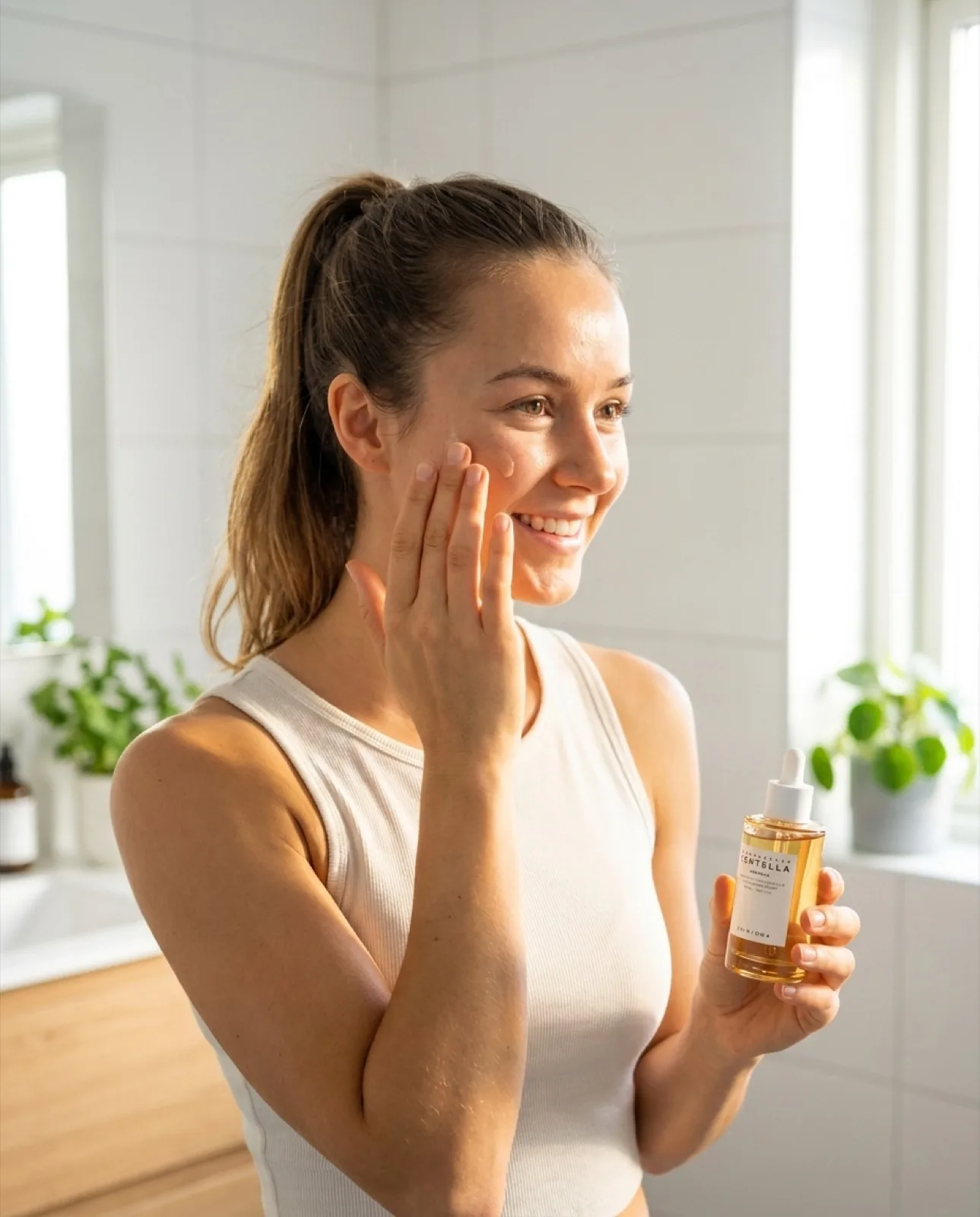
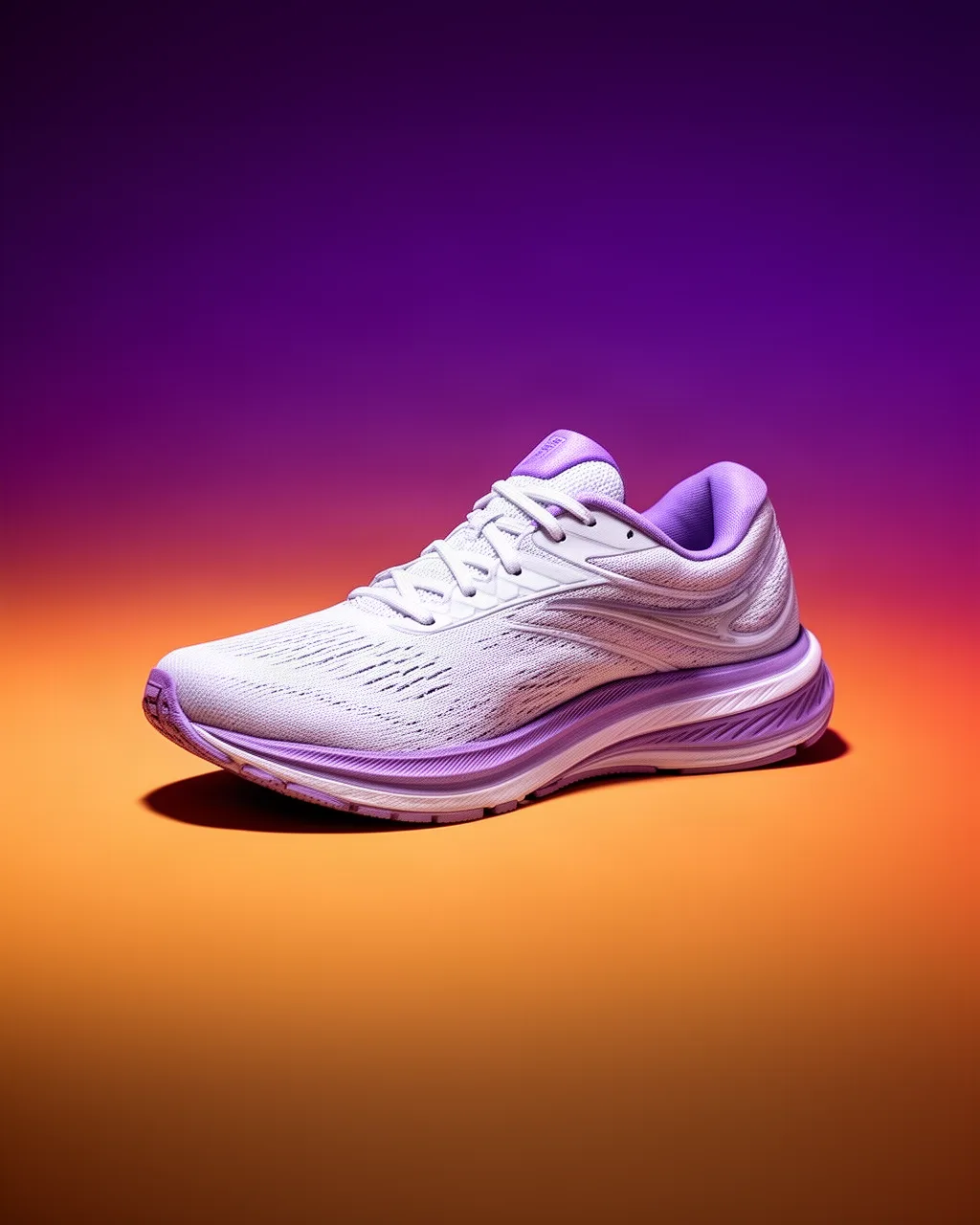
Left, the lifestyle recipe: a person actually using the product, daylight through a window, authentic setting. Right, the clean-product recipe (gradient background, dramatic side light, subtle shadow below), which is a lighting formula rather than a category, and transfers from a phone to a sneaker without a rewrite. These are creatives produced on the platform, not the literal output of the prompt strings above.
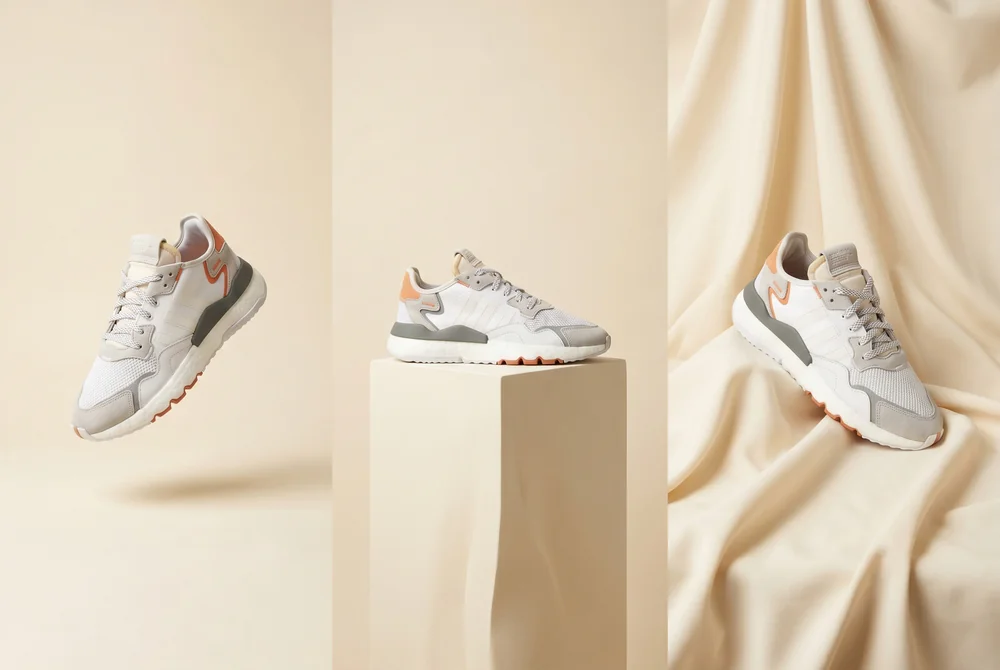
The fashion recipe held constant while only the surface changes: floating, plinth, draped fabric. That is exactly the 'lock the frame, vary the scene' technique described below. For the full product route, read our guide to product photography with FLUX.
The step-by-step version of that product route, from phone photo to export, is in product photography with FLUX.
How do you edit and iterate with FLUX?
Generation, editing and definition are three different jobs, and FLUX splits them across three tools: FLUX.2 (or FLUX 1.1 Pro on the API) generates from text, FLUX Kontext edits an existing render from an instruction, and Image Enhancer adds definition afterwards, since no FLUX model has an upscale parameter.
Editing an existing image: switch to FLUX Kontext
FLUX.2 and FLUX 1.1 Pro generate from text. To restyle a product photo you already have, or to fix one area of a render, use FLUX Kontext instead: you give it the source image plus a plain-language instruction, with no mask to draw and no strength slider to tune.
Emphasis through wording, not weight syntax
The (element:1.5) weighting syntax inherited from Stable Diffusion has no effect here. To push an element forward, name it first in the sentence, describe it in more detail than the rest of the scene, and state its place in the composition explicitly: "centered", "filling the frame", "in sharp focus".
Batch generation with incremental seed
Generate 20 variations of the same prompt, incrementing the seed by 1 each time. You get 20 different interpretations of the same concept. Perfect for pinpointing the best angle.
Lock the frame, vary the scene
Keep aspect_ratio and seed fixed and change only one clause of the prompt (the surface, the light direction, the color of the background). You isolate a single variable, which is what makes an A/B test on creatives actually readable.
Hold the product with reference images
On FLUX.2 in SociaLover, attach your product photo as a reference (up to four) and describe only the scene. The packaging, the label and the proportions stay identical across renders, which text alone never guaranteed on FLUX 1.1 Pro.
Frequently asked questions
- Which FLUX models are in SociaLover?
- Two, as of September 2026: FLUX.2, which generates from text in 1K or 2K and accepts up to four reference images, and FLUX Kontext, which edits an existing image from a plain-language instruction. Both are in Studio Image, Creative Designer and Workflow Pro, billed in tokens included in your plan. FLUX 1.1 Pro, FLUX 1.1 Pro Ultra and the other FLUX.2 tiers are Black Forest Labs API models, not offered in SociaLover.
- Is FLUX 1.1 Pro still worth using in 2026?
- In two cases. If your pipeline is already built on the Black Forest Labs API, 1.1 Pro remains fast, strong on skin and material texture, and consistent from one seed to the next. And if you need the raw mode of its Ultra variant for faces that have to read as unretouched photos, at up to 4 megapixels. For a new project, and for anything in SociaLover, FLUX.2 is the default: same prompt style, plus reference images.
- What is the difference between FLUX.2 and FLUX Kontext?
- FLUX.2 generates a new image from a text prompt, optionally guided by up to four reference images. FLUX Kontext edits an image you already have: you give it one source image plus an instruction such as "replace the background with a marble surface" and it modifies that visual, with no mask to draw and no strength slider. In SociaLover, FLUX.2 renders in 1K or 2K and FLUX Kontext in 1K.
- What is Raw mode in FLUX 1.1 Ultra?
- A switch on FLUX 1.1 Pro Ultra, on the Black Forest Labs API, that returns a less processed, more photographic rendering: closer to an unretouched camera file, with more natural skin and less of the polished look most models add by default. It is the setting for faces and lifestyle scenes that have to look candid. FLUX.2 in SociaLover has no equivalent switch; describe "unretouched, natural skin texture" in the prompt instead.
- Does FLUX support negative prompts?
- No. No FLUX model is a Stable Diffusion checkpoint: there is no negative prompt, no sampling step count and no CFG or guidance scale. What you actually control is the prompt itself, the output geometry, the seed, and a handful of API switches such as prompt_upsampling, output_format, raw (Ultra only) and safety_tolerance. To exclude something, phrase the scene without it, and keep exclusions to one or two words such as "no text".
- How do I push one element forward in a FLUX prompt?
- Not with weights. The (element:1.5) syntax inherited from Stable Diffusion has no effect on this model. Name the element first in the sentence, describe it in more detail than the rest of the scene, and state its place in the composition explicitly: "centered", "filling the frame", "in sharp focus". On FLUX.2 you can also attach the element itself as a reference image.
- How do I get a higher-resolution image out of FLUX?
- Not through the prompt. No FLUX model has an upscale parameter, and asking for "8K" only acts as a style cue; it does not change the output resolution. In SociaLover, choose 2K on FLUX.2; on the API, set an exact size with width and height in multiples of 32, or use FLUX 1.1 Pro Ultra for up to 4 megapixels. Then send the finished image through Image Enhancer if a close-up needs more definition.
- How do I generate controlled variations of the same visual?
- Keep the seed and the aspect_ratio fixed and change a single clause of the prompt: the surface, the light direction, the background color. That isolates one variable, which is what makes an A/B test on creatives readable. For pure exploration, do the opposite: keep the prompt and increment the seed by 1 across twenty renders. On FLUX.2, keep the same reference image across all of them so the product never drifts.
Conclusion
FLUX is a solid default for ad visuals: realism, instruction following and texture rendering are its strengths on both generations. Prompt mastery is the key skill, precisely because the model gives you so few knobs to turn: the prompt, the geometry, the seed and, on FLUX.2, the reference images are almost the whole surface.
In SociaLover, FLUX.2 and FLUX Kontext sit in Studio Image and Creative Designer alongside Nano Banana Pro and 2, GPT Image 2, Seedream 4.5, Recraft V4.1 and others. FLUX 1.1 Pro and its Ultra raw mode stay on the Black Forest Labs API. No single model is the platform's engine: the point is to send the same brief to several of them and keep the one that renders your product best.